Docker Engine and Compose
Docker Engine (dockerd) manages images, containers, networks, and volumes. The docker CLI talks to it; containerd is the lower runtime; Buildx builds images; the Compose plugin defines applications in YAML. Installing these components does not deploy an application.
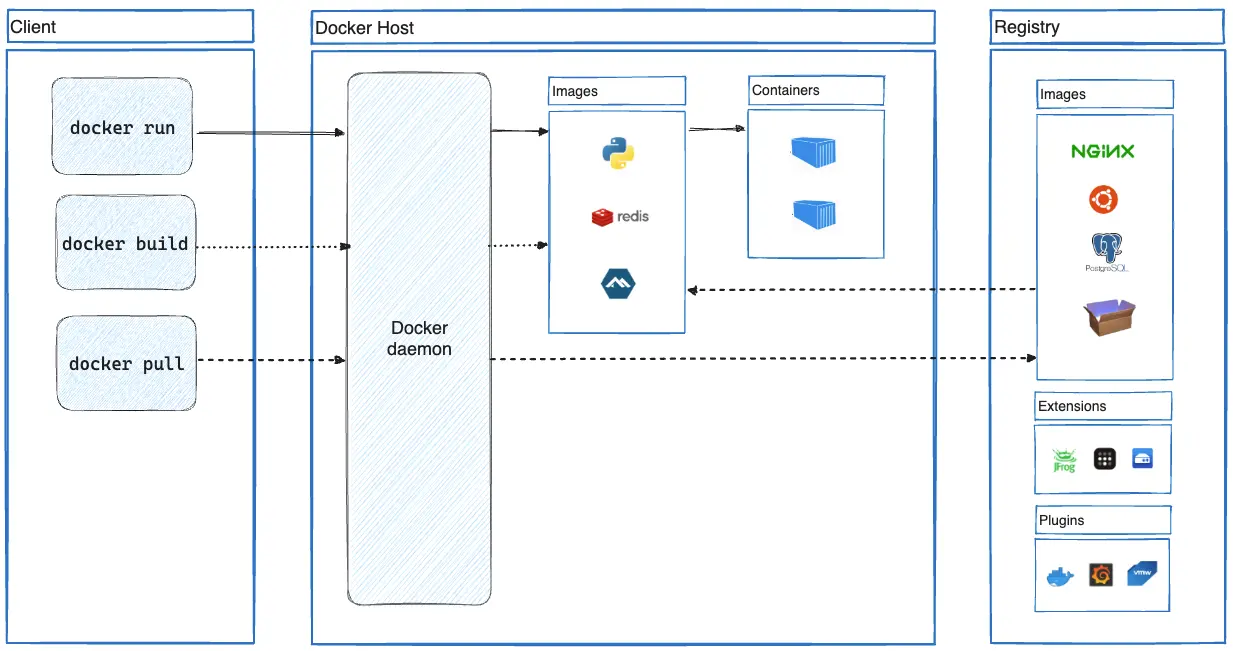 Open full-size image
Follow the commands from the client to the daemon. build creates an image, pull retrieves one from a registry, and run creates and starts a container from an image, pulling it first if needed. The image and its running container are separate objects. Compose uses the same Engine to manage several services; it is not shown in this diagram.
Inspect the VPS first. If a supported Docker installation already works, do not reinstall it or mix package sources.
command -v docker || true
docker --version || true
docker compose version || true
dpkg -l | grep -E 'docker|containerd' || true
For a new installation, follow Docker’s official Ubuntu repository instructions rather than mixing them with Ubuntu’s docker.io packages:
sudo install -m 0755 -d /etc/apt/keyrings
sudo curl -fsSL https://download.docker.com/linux/ubuntu/gpg \
  -o /etc/apt/keyrings/docker.asc
sudo chmod a+r /etc/apt/keyrings/docker.asc
Read this VPS’s Ubuntu codename and architecture:
. /etc/os-release
printf '%s\n' "${UBUNTU_CODENAME:-$VERSION_CODENAME}"
dpkg --print-architecture
Create the repository file below, replacing both placeholders with those actual values. If the file already exists, inspect it instead of overwriting it blindly.
Types: deb
URIs: https://download.docker.com/linux/ubuntu
Suites: <UBUNTU_CODENAME>
Components: stable
Architectures: <DPKG_ARCHITECTURE>
Signed-By: /etc/apt/keyrings/docker.asc
Refresh the package index and inspect the candidates. Stop if the official repository has no candidate for the detected release; do not substitute another Ubuntu codename.
sudo apt update
apt-cache policy docker-ce docker-ce-cli containerd.io \
  docker-buildx-plugin docker-compose-plugin
sudo apt-get -s install docker-ce docker-ce-cli containerd.io \
  docker-buildx-plugin docker-compose-plugin
Review the simulation for removals or conflicts before running the installation:
sudo apt install -y docker-ce docker-ce-cli containerd.io \
  docker-buildx-plugin docker-compose-plugin
systemctl is-enabled docker
systemctl is-active docker
Add only a trusted administrator to the Docker group:
sudo usermod -aG docker "$VPS_USER"
Log out and reconnect over Tailscale so the new login receives the group membership. Then check it and run the test container:
id
docker info
docker run --rm hello-world
Never use chmod 666 /var/run/docker.sock. Docker-group membership already grants root-level capability. --rm removes the test container, not its cached image.
Images are templates, containers are instances, and volumes or deliberate host paths hold persistent data. Do not edit /var/lib/docker manually. Review every future published port because Docker networking can bypass UFW.