Combining DataFrames
Use merge to relate rows by keys and concat to stack or align whole objects.
The important question is not syntax but the relationship you expect.
Join deliberately
import pandas as pd

orders = pd.DataFrame({"order_id": [1, 2, 3], "customer_id": ["A", "A", "B"]})
customers = pd.DataFrame({"customer_id": ["A", "C"], "name": ["Ada", "Lin"]})
result = orders.merge(
    customers,
    on="customer_id",
    how="left",
    validate="many_to_one",
    indicator=True,
    suffixes=("_order", "_customer"),
)
Cardinality
Choose the validate contract before looking at the output:
one_to_one: both keys unique.one_to_many: left key unique.many_to_one: right key unique.many_to_many: duplication is expected; check output size explicitly.
Unexpected duplicate keys can multiply rows and corrupt aggregates. Check key uniqueness before the merge when the relationship is part of the data contract.
Relational Data, SQL, and Transactions carries these cardinality checks over to SQL aggregates and database constraints.
Diagnose unmatched keys
With indicator=True, inspect _merge values (left_only, right_only, both).
Do not simply drop the indicator without explaining unmatched records.
Pandas matches null keys to other null keys during a merge, unlike typical SQL join semantics. Remove, fill, or isolate null keys first when that match is not meaningful.
Concatenate
january, february = orders.iloc[:2], orders.iloc[2:]
features = orders[["order_id"]]
labels = pd.Series([1, 0, 1], index=orders.index)
rows = pd.concat([january, february], ignore_index=True)
columns = pd.concat([features, labels.rename("target")], axis="columns")
Row concatenation aligns columns; column concatenation aligns indexes. Use
ignore_index=True only when old row labels carry no meaning. Add keys= when
the source partition should remain traceable.
Time-aware joins
Use merge_asof for nearest-key time joins after sorting by the join key. Specify
direction and tolerance so “nearest” does not quietly become an arbitrary match.
Join types and row multiplication
The merge API returns a new DataFrame. Here a left join keeps three orders: names are Ada, Ada, missing, and _merge is both, both, left_only. A left join cannot reveal customers with no orders; use an outer join to expose C as right_only. An inner join retains only matching keys (two rows here), a right join preserves right-side keys, and an outer join preserves their union.
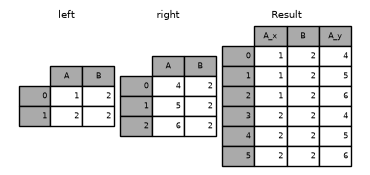
If a key occurs twice on the left and three times on the right, that key contributes six rows. validate="many_to_many" performs no uniqueness checks; it is not a size safeguard. Repeating A in customers makes the example’s many_to_one validation raise pd.errors.MergeError. Explicit on= prevents unintended joins on every shared column name.
 Open full-size image
Follow the shared key B = 2: each of the two left rows pairs with all three right rows, producing six combinations. A_x and A_y retain the values from the respective tables. This is the duplicate-key case discussed above; the opening orders example instead requires unique customer keys through many_to_one.