NumPy
An ndarray has a fixed dtype describing every element slot; a (2, 3) array has two rows and three columns, not two independent Python lists. This reference covers dense in-memory arrays and assumes Python indexing and slicing. The examples use APIs available in NumPy 1.26 and 2.x; specify fixed-width dtypes when representation matters, since inferred integer widths and promotion rules can vary. Integer arrays have finite range and can overflow.
Official Site
Importing Numpy
import numpy as np
Array Creation
Creating Arrays
# One-dimensional array
a = np.array([1, 2, 3], dtype=np.int64)
print(a)
# [1 2 3]
print(a.ndim)
# 1

# Multi-dimensional array
b = np.array([[1,2,3],[4,5,6]])
print(b)
# [[1 2 3]
#  [4 5 6]]
Array Attributes
# Shape of array
b.shape  # (2, 3)

# Type of elements in the array
a.dtype  # dtype('int64')

# Floats in numpy arrays
c = np.array([2.2, 5, 1.1])
print(c.dtype.name)
# float64
print(c)
# [2.2 5.  1.1]
Creating Arrays with Initial Placeholders
# Array of zeros
d = np.zeros((2,3))
print(d)
# [[0. 0. 0.]
#  [0. 0. 0.]]

# Array of ones
e = np.ones((2,3))
print(e)
# [[1. 1. 1.]
#  [1. 1. 1.]]

# Array with random numbers
rng = np.random.default_rng(42)
print(rng.random((2, 3)))
# [[0.77395605 0.43887844 0.85859792]
#  [0.69736803 0.09417735 0.97562235]]
Creating Sequences
# Sequence of numbers
f = np.arange(10, 50, 2)
print(f)
# [10 12 14 16 18 20 22 24 26 28 30 32 34 36 38 40 42 44 46 48]

# Sequence of floats
print(np.linspace(0, 2, 15))
# [0.         0.14285714 0.28571429 0.42857143 0.57142857 0.71428571
#  0.85714286 1.         1.14285714 1.28571429 1.42857143 1.57142857
#  1.71428571 1.85714286 2.        ]
Shapes, axes, and broadcasting
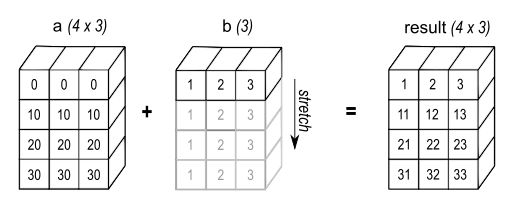
Broadcasting compares dimensions from the right: each pair must be equal or one must be 1; missing leading dimensions act as 1. Thus (2, 3) + (3,) adds a vector to each row, but (2, 3) + (2,) fails. Reshape the latter to (2, 1) to add one value per row. Broadcasting avoids copying repeated inputs, but the output and intermediate results still need memory.
A reduction’s axis is the dimension being removed: axis=0 reduces rows, leaving a value per column; axis=1 reduces columns, leaving a value per row. keepdims=True retains a size-1 axis for subsequent broadcasting. Reshape preserves element count; only one -1 dimension may be inferred. A one-dimensional vector has no row/column orientation, so .T does not change its shape. Use v[:, None] for a column.
x = np.arange(6).reshape(2, 3)
assert (x + np.array([10, 20, 30])).tolist() == [[10, 21, 32], [13, 24, 35]]
assert x.sum(axis=0).tolist() == [3, 5, 7]
assert x.sum(axis=1).tolist() == [3, 12]
centered = x - x.mean(axis=1, keepdims=True)
assert centered.tolist() == [[-1.0, 0.0, 1.0], [-1.0, 0.0, 1.0]]
assert x.reshape(-1).shape == (6,)
 Open full-size image
The three values on the rightmost axis line up. The vector therefore applies to all four rows. The pale repeated rows illustrate the arithmetic; broadcasting does not require physically copying the input vector into four rows. Compare this with the two-row example above.
Array Operations
Arithmetic Operations
# Creating arrays
a = np.array([10,20,30,40])
b = np.array([1, 2, 3, 4])

# Elementwise operations
print(a - b)
# [ 9 18 27 36]
print(a * b)
# [ 10  40  90 160]

# Converting Fahrenheit to Celsius
fahrenheit = np.array([0, -10, -5, -15, 0])
celsius = (fahrenheit - 32) * (5/9)
print(celsius)
# [-17.77777778 -23.33333333 -20.55555556 -26.11111111 -17.77777778]
Boolean Arrays
# Boolean array example
print(celsius > -20)
# [ True False False False  True]
print(celsius % 2 == 0)
# [False False False False False]
Matrix Operations
A = np.array([[1,1],[0,1]])
B = np.array([[2,0],[3,4]])

# Elementwise product
print(A * B)
# [[2 0]
#  [0 4]]

# Matrix product
print(A @ B)
# [[5 4]
#  [3 4]]
Upcasting
array1 = np.array([[1, 2, 3], [4, 5, 6]])
array2 = np.array([[7.1, 8.2, 9.1], [10.4, 11.2, 12.3]])

# Addition of arrays
array3 = array1 + array2
print(array3)
# [[ 8.1 10.2 12.1]
#  [14.4 16.2 18.3]]
print(array3.dtype)
# float64
Aggregation Functions
# Sum, max, min, and mean
print(array3.sum())
# 79.3
print(array3.max())
# 18.3
print(array3.min())
# 8.1
print(array3.mean())
# 13.216666666666667

# Aggregation on 2D arrays
b = np.arange(1, 16, 1).reshape(3, 5)
print(b)
# [[ 1  2  3  4  5]
#  [ 6  7  8  9 10]
#  [11 12 13 14 15]]
Indexing, Slicing, and Iterating
Indexing
# One-dimensional array
a = np.array([1, 3, 5, 7])
print(a[2])
# 5

# Multidimensional array
a = np.array([[1, 2], [3, 4], [5, 6]])
print(a[1, 1])
# 4
print(np.array([a[0, 0], a[1, 1], a[2, 1]]))
# [1 4 6]
print(a[[0, 1, 2], [0, 1, 1]])
# [1 4 6]
Boolean Indexing
# Boolean array example
print(a > 5)
# [[False False]
#  [False False]
#  [False  True]]
print(a[a > 5])
# [6]
Slicing
# One-dimensional slicing
a = np.array([0, 1, 2, 3, 4, 5])
print(a[:3])
# [0 1 2]
print(a[2:4])
# [2 3]

# Multidimensional slicing
a = np.array([[1, 2, 3, 4], [5, 6, 7, 8], [9, 10, 11, 12]])
print(a[:2])
# [[1 2 3 4]
#  [5 6 7 8]]
print(a[:2, 1:3])
# [[2 3]
#  [6 7]]
Slices Usually Share Memory
# Basic slicing usually returns a view that shares memory with the source.
sub_array = a[:2, 1:3]
sub_array[0, 0] = 50
print(sub_array[0, 0])
# 50
print(a[0, 1])
# 50
print(np.shares_memory(a, sub_array))
# True

# Use copy() when the result must be independent.
independent = a[:2, 1:3].copy()
Advanced indexing with integer or Boolean arrays usually returns a copy instead. Use np.shares_memory() when the distinction matters.
Loading a Small Delimited Dataset
A self-contained example avoids relying on a particular downloaded file or column schema:
from io import StringIO

csv_data = StringIO("""height,score
1.70,82
1.82,91
1.65,76
""")
records = np.genfromtxt(csv_data, delimiter=",", names=True)

print(records.dtype.names)
# ('height', 'score')
print(records["score"].mean())
# 83.0
Copies, numerical comparison, and reproducibility
The copy/view contract is precise: basic array slices share data; reading through integer-array or Boolean-array indexing creates a copy. Direct indexed assignment such as x[x < 0] = 0 still modifies x. reshape returns a view when possible, otherwise a copy; flatten() always copies. a + b normally creates a result, while a += b writes to a and cannot silently change its dtype to accommodate floats. For 2-D matrix multiplication, (m, k) @ (k, n) gives (m, n); * is elementwise.
== produces an elementwise Boolean array, not a single verdict. np.array_equal checks exact values and shape. For finite floating-point values, np.allclose tests abs(a-b) <= atol + rtol*abs(b); matching infinities of the same sign compare equal, while finite values do not compare close to infinities. Choose tolerances in the units and precision of the problem. It allows broadcasting, so check shape separately if required. NaN compares unequal unless equal_nan=True is requested. Reductions such as sum propagate NaN; nansum skips it, which is a different missing-data policy. The examples in Floating-Point Numbers and Stable Computation explain this choice and the effect of summation order.
arange normally excludes its stop, but floating-point rounding can cause the stop to appear or the final value to exceed it; linspace specifies a count and includes the endpoint by default. The random example uses a local seeded Generator, so rerunning it starts the same stream in a matching environment. Record the NumPy version and generator when exact long-term reproduction matters; a seed alone is not a cross-version stream guarantee.
expected = np.array([0.3])
actual = np.array([0.1]) + 0.2
assert not np.array_equal(actual, expected)
assert actual.shape == expected.shape
assert np.allclose(actual, expected, rtol=0, atol=1e-15)