GitHub Branching and Collaboration
A branch keeps a change separate while it is developed and reviewed. The repository's default branch is the usual integration target; its name and whether it is deployable are project choices, not Git rules.
Branch workflow
git fetch origin
git switch -c fix/short-description origin/main

# edit and test
git add path/to/file
git commit -m "Fix the short description"
git push -u origin fix/short-description
Replace main with the repository's actual default branch. Open a pull request from the feature branch, explain why the change is needed, summarize the verification, and keep unrelated work out of the same diff.
A pull request can be opened before the code is finished; mark it as a draft when it is not ready to merge. Who may approve or merge is determined by branch protection and repository policy. Many teams require approval from someone other than the author.
Reviews and merges
A useful review checks behavior, tests, security boundaries, compatibility, and unnecessary changes. Resolve the discussion or explain why no change is needed. Before merging, update the branch if the base moved and rerun checks affected by the update.
Repositories may use merge commits, squash merges, or rebases. Follow the local convention rather than rewriting shared history by default. Delete a merged feature branch when it no longer has a purpose. The integrated changes remain on the base branch, but squash merging replaces the branch's commits with one commit, and GitHub rebase merging creates new commit IDs. Do not rely on a deleted branch to preserve the original commit sequence.
 Open full-size image
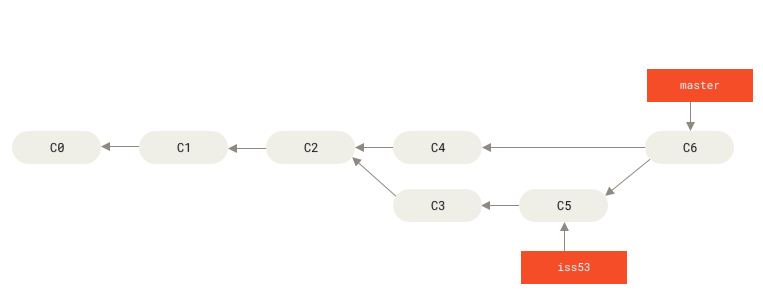
Look at C6: its two arrows point to the parent commits C4 and C5, joining the histories that diverged at C2. The branch labels point to commits; deleting iss53 after this merge does not remove C5 from the merged history. This figure shows a merge commit, not a squash or rebase. The book uses master as its example branch name.
Fork workflow
For a repository where you cannot push branches directly, create a fork and use two remotes:
git clone https://github.com/YOU/PROJECT.git
cd PROJECT
git remote add upstream https://github.com/OWNER/PROJECT.git
git fetch upstream
Here origin is the fork and upstream is the source repository. To refresh a local default branch without relying on ambiguous pull settings:
git switch main
git fetch upstream
git merge --ff-only upstream/main
git push origin main
Then create the contribution branch from the refreshed default branch. If the upstream branch is not named main, use its real name.
Before pushing
- Read the repository's contribution and agent instructions.
- Check
git status, the unstaged diff, and the staged diff. - Run the smallest tests that can catch the change's likely failures.
- Confirm that no credential, private data, generated artifact, or unrelated edit entered the commit.
- Push only to the intended remote and branch.
A fork retains the upstream project's license obligations. Contribution rights and review rules come from that project, not from the existence of the fork button.
References
Practice in Learn Git Branching, a repository simulator in the browser. Make a branch, add commits, and compare merge with rebase while watching the commit graph. Its exercises change a simulated repository, which makes the effect of moving branch pointers visible before applying commands to a real project.